Yet many small businesses treat postcard design as an afterthought, throwing together a layout without a clear goal, audience, or visual strategy. The result is a piece that gets glanced at and tossed. According to the ANA's 2023 Response Rate Report, postcards were the most widely used direct mail format — used by 76% of marketers for house lists — which means the competition for attention is real.
This guide walks through a step-by-step design process, the specific elements that drive responses, what to prepare before you open a design tool, and the mistakes that kill most campaigns before they start.
Key Takeaways
- Start with one goal and a clear audience profile before any visual work begins
- Lead with a benefit-driven headline, one strong image, and a single CTA
- Use both sides strategically: the front grabs attention, the back reinforces the offer
- Simplicity beats clutter; white space is a design tool, not wasted space
- Build tracking (QR code, promo code, or PURL) into the design from day one
Step-by-Step: How to Design a Postcard That Drives Action
Step 1: Define Your Goal and Audience
Every effective postcard starts with one specific objective. Are you driving a phone call, a website visit, a store visit, or a promo redemption? That single decision shapes everything: the headline, the imagery, the CTA, the offer.
Once your goal is clear, build a profile of who's receiving this card. Consider:
- Demographics: Age, location, household income, homeowner status
- Behavior: Past purchase history, browsing behavior, stage in the buying cycle
- Priorities: What problem are they trying to solve? What matters to them?
Audience clarity is what separates a postcard that feels relevant from one that feels like junk mail. Keypoint Intelligence found that nearly 60% of consumers pay attention to direct mail when the offer aligns with their interests — and 59% made a purchase in the prior three months as a result of a mailer they received.
Step 2: Map Out Your Layout and Visual Hierarchy
Before you touch a design tool, sketch your layout on paper. Visual hierarchy determines the order in which a reader's eye processes your card — and you control that sequence.
The standard flow: headline first, image second, body copy third, CTA last. Every element should guide the reader through that path in a clear, uninterrupted order.
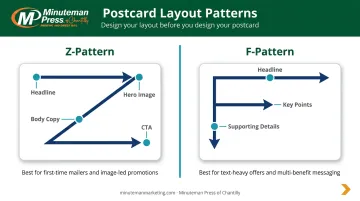
Two common layout patterns work well for postcards:
- Z-pattern: The eye travels in a Z shape across the card — ideal for image-forward designs with minimal copy
- F-pattern: The eye scans horizontally then drops — better suited for information-heavy layouts with several key points
A practical benchmark: aim for 60% visuals, 40% text on the front of the card. This isn't a hard rule, but it keeps designs from becoming text-heavy walls that readers skip past.
Step 3: Write Your Headline and Body Copy
The headline is the highest-stakes element on the card. It needs to communicate a clear benefit, use action-oriented language, and be readable from arm's length.
Think: "Save 20% This Week Only" or "Get Your Free Home Estimate." Keep it short, direct, and benefit-first.
USPS Delivers recommends keeping copy "short and punchy" — focused on a primary message rather than trying to tell a full brand story. That advice applies especially to postcards, where you have seconds of attention.
For body copy, stick to the essentials:
- What the offer is
- Why it matters to this specific recipient
- Any urgency or deadline ("Offer expires June 30")
Two to four short sentences, or a brief bullet list, is enough. Anything longer competes with your CTA for attention.
Step 4: Place Your CTA and Add a Tracking Mechanism
A strong CTA follows a simple formula: action verb + specific benefit + urgency. For example: "Claim 20% Off — Offer Ends Friday."
The CTA must be visually impossible to miss. Use a color block, bold button, or arrow pointing to it. It should appear on both sides of the postcard — once on each side reinforces the message and catches readers who flip the card first.
Add your tracking mechanism at this same stage — it needs to be designed in, not bolted on afterward:
- Unique promo codes: Tied to specific campaign segments; redeemed at checkout or point of sale
- QR codes: Linked to a dedicated campaign landing page for attributable digital traffic
- Personalized URLs (PURLs): Recipient-level tracking with personalized content delivery
Without a tracking mechanism, you'll have no way to calculate ROI or improve the next campaign.
Key Design Elements Every High-Converting Postcard Needs
Great postcard design is purposeful. Every visual choice — color, font, image, white space — should move the reader toward the CTA.
Headline Design and Placement
Your headline should dominate the front of the card visually. Best practices:
- Large, high-contrast font — readable at a glance, not just up close
- Placed at the top or in the dominant visual zone
- Benefit-driven phrasing — lead with what the reader gains
- Avoid all-caps — it reduces readability and can feel aggressive in tone
Imagery That Works With Your Message
One strong image consistently outperforms a collection of smaller ones. A product photo, a satisfied customer, or a clean branded visual all work — as long as the image and headline reinforce each other visually.
Generic or low-resolution stock photos undermine credibility and dilute the professionalism of the piece. Research in the Journal of Business Research found that additional images only help when they present new information — if they repeat the same point, they add clutter without lifting response.
Brand Consistency: Colors, Fonts, and Logo
Inconsistent branding breaks trust, especially in multi-touchpoint campaigns.
- Use your core brand palette for overall tone; reserve bold accent colors exclusively for CTAs and key offers
- Stick to one or two clean fonts — sans-serif for modern clarity, simple serif for warmth
- Decorative fonts should be used sparingly and never smaller than 12pt
- Logo on both sides — this is non-negotiable for brand recognition
Using the Back of the Postcard Strategically
The back isn't dead space. Use it to:
- Reinforce the headline or expand the offer
- Repeat the CTA with contact details (phone, website, address)
- Include your QR code or promo code
- Comply with USPS address panel and barcode clear zone requirements
White Space and Simplicity as Design Tools
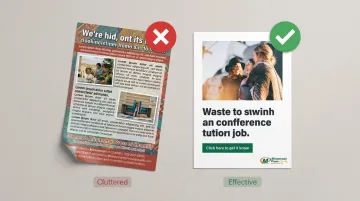
Generous negative space makes every element stand out and reduces the visual confusion for the reader. When a card feels cluttered, the message gets lost before the CTA ever registers.
A print advertising study by Arizona State University researchers found that white space is specifically used to increase overall attention and focus it on the product and brand name. For postcard design, that means deliberate breathing room around your headline and CTA — so the reader's eye lands exactly where you need it.
What to Prepare Before You Start Designing
Decisions about size, paper stock, and postal compliance directly affect how the final piece looks and whether it reaches recipients on schedule.
Postcard Size Selection
| Size | USPS Classification | Best For |
|---|---|---|
| 4" × 6" | First-Class postcard rate | Tight budgets, simple messages |
| 5.5" × 8.5" | Letter rate | Mid-range campaigns, more copy space |
| 6" × 11" | Letter rate | Maximum mailbox presence, complex offers |
The 4" × 6" format qualifies for USPS First-Class Mail postcard pricing (starting from $0.61 per piece), which lowers campaign costs significantly. Larger formats command more attention in the mailbox but are billed at letter rates, so factor the cost difference into your budget before committing to a size.
Minuteman Press of Chantilly offers all five common postcard sizes: 4"×6", 5"×7", 6"×9", 5.5"×8.5", and 6"×11", so you can match the format to your campaign without switching vendors.
Paper Quality and Print Specs
Paper stock communicates quality before the recipient reads a single word. Thin, flimsy cards risk arriving damaged and signal low investment.
For professional direct mail postcards, consider:
- Heavy Gloss Cover (111# Gloss): Durable, vibrant color — ideal for most direct mail campaigns
- Gloss Cardstock (130# Gloss) or Heavy Gloss Cardstock (16PT C2S): Maximum rigidity for premium campaigns
- Silk Cardstock (130# Silk) or Heavy Silk Cardstock (16PT C2S Silk): Refined, matte-satin finish for luxury or upscale brands
Minuteman Press of Chantilly prints across all these stocks using modern offset technology, which delivers stronger color accuracy and sharper ink adhesion than standard digital printing. If you're deciding between gloss and silk, consider your brand tone: gloss works well for bold, high-contrast designs; silk suits refined palettes and upscale messaging.
USPS Compliance Requirements
Non-compliance doesn't just cause delays — it can trigger postage surcharges that exceed your budget unexpectedly. Key requirements:
- Minimum card dimensions: 3½" × 5" × 0.007" thick for postcard rate eligibility
- Maximum card dimensions: 4¼" × 6" × 0.016" thick (anything larger is billed as a letter)
- Aspect ratio: Length ÷ height must fall between 1.3 and 2.5
- OCR read area: Keep the address panel clear — bounded ½" from left/right edges, 2¾" from the bottom at the top of the area
- Barcode clear zone: Bottom-right corner extending 4¾" from the right edge and ⅝" from the bottom
Minuteman Press of Chantilly's postcard templates are formatted to USPS specifications by default, so standard compliance requirements are already built into the design files when you order.
Common Postcard Design Mistakes to Avoid
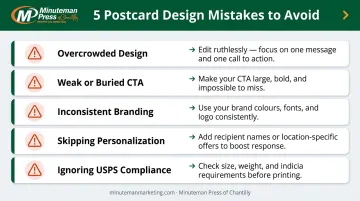
Most underperforming postcards share the same set of avoidable errors:
- Overcrowding the design: Multiple offers, competing headlines, and dense paragraphs cause readers to disengage immediately. One message, one CTA, one visual focus.
- Weak or buried CTA: "Learn More" blends into body copy and prompts nothing. Your CTA must be visually dominant, benefit-specific, and impossible to miss.
- Inconsistent branding: Non-brand colors, unfamiliar fonts, or a missing logo create distrust — especially when the postcard is one of several touchpoints in a campaign.
- Skipping personalization: Generic postcards consistently underperform. According to Keypoint Intelligence, roughly two-thirds of consumers pay more attention to mail addressed specifically to them.
- Ignoring USPS compliance is another common misstep — designs that violate address panel or barcode clear zone rules cause processing delays and unexpected postage costs.
How to Track Whether Your Postcard Campaign Is Working
Without a tracking mechanism, you're guessing at ROI. The ANA's 2023 report found that 82% of direct mail marketers now use online tracking mechanisms — up from 67% in the prior study. Skipping this step means you can't prove what's working — or cut what isn't.
Three practical methods to build into your design:
- Unique promo codes: Assign a code per campaign segment (e.g., "SPRING25") and track redemptions at checkout or point of sale
- QR codes: Link to a dedicated campaign landing page — all traffic from that URL is traced back to the mailer
- Personalized URLs (PURLs): Recipient-level tracking with the ability to serve personalized landing page content
Before you mail, record a baseline: current website traffic, inbound call volume, or average weekly order rate. When responses come in, compare against that number — that's how you calculate actual lift from the campaign.
Frequently Asked Questions
How do you design a good postcard?
Start with one clear goal and a defined audience. Lead with a benefit-driven headline, use a single strong image, keep body copy to two to four sentences, and make the CTA visually impossible to miss. Include a tracking mechanism — QR code, promo code, or PURL — before you finalize the design.
What are the most common postcard design mistakes?
The most frequent errors are overcrowding the layout with multiple offers, using a vague or visually buried CTA, inconsistent branding, low-resolution imagery, and forgetting USPS address panel and barcode clear zone requirements. All are preventable when you plan layout and compliance requirements before opening a design file.
What postcard size works best for direct mail?
A 4"×6" is the most cost-efficient option and qualifies for USPS First-Class postcard rates. A 5.5"×8.5" or 6"×11" card stands out more in the mailbox and provides more room for complex offers, but these are billed at letter rates. The right size depends on your message complexity and budget.
How much text should a postcard have?
The front should carry minimal copy — headline, subhead, and one key benefit statement. The back can expand the offer and repeat the CTA. Less copy and more white space improves readability and response rates.
Should I use both sides of a postcard?
Yes. The front captures attention with bold visuals and a headline. The back reinforces the offer, repeats the CTA, and includes contact details and a QR code — while keeping the USPS address zone clear. Leaving either side blank wastes paid print real estate.
How do I track postcard campaign results?
Use a QR code linked to a campaign-specific landing page, a unique promo code per mailing segment, or personalized URLs. Build tracking into the design from the start and record a baseline for web traffic or call volume so you can measure the postcard's actual impact.